


App Development Timeline: How Long Does It Take to Make My App?

It is now easier than ever to make your own app. All you need is some basic knowledge of coding and a computer with internet connection. But how long does it take to develop an app and how about the app development timeline? For some apps, it can be as quick as a week or two, but for others it could take months or years. It all depends on the complexity of the app and how much work goes into developing it. 

This article will explore the various stages of app development and look at the timeline for different types of apps. You’ll also learn about cost, resources needed, and skills required for each stage. The article will also cover these stages in more depth so that you know what you’re getting into when you start making your own app.

What is the app development timeline?

App development timeline is the timing process of creating an app. It can be complicated and lengthy, depending on the type of app you want to create. The good news is that there are many tools to help simplify the development timeline process, including platforms that offer templates for different types of apps.

How long does it take to make an app: An overview of app development timeline

How long does it take to make an app: An overview of app development timeline

1. 2-3 first weeks in the Planning stage

When you start planning your app, you need to choose a niche and decide what type of app it will be. You also need to figure out how long it will take to make your app. This stage might spend 2-3 weeks working depending on the features your app will have, along with any other information that is required for development, such as how much storage space all the features might take up. In this stage, you should also decide if you would like to use an existing framework or build your own.

2. Next 2 – 3 week in a Business Analysis stage

The next stage of app development is business analysis. It takes at least two weeks for someone with a basic understanding of coding to set up the project and create an outline for the app. The business analysis takes into account what the app is, how it will be used, and where it will be used. This includes research about competitors, market size, demographics, and parameters for success. During this stage, you are able to figure out what the target audience is, who your competitors are, and what resources would be needed to market your app.

This stage is important because without the right data you won’t know if you’re making a good decision with your app or not.

3. Spend 5 – 7 weeks in the Design and Pre-Development stage

The design and pre-development stage is generally the first phase of app development. This stage is where you develop a basic idea for your app, it’s design and other necessary components like user interface (UI) layout, graphics and color schemes.

This stage also includes developing a development plan to make sure that the app will be completed in the allotted time frame. The actual coding takes place once a developer has been hired to work on the project.

This is one of the main stages, which takes approximately five to seven weeks. This stage includes designing the look and structure of your app, coming up with a functional idea, and deciding on the scope of work you need to complete. During this stage, you should decide what type of app you want to create and how long it will take for you to develop it. Some apps can take months or even years to build, so you’ll need some patience if you’re planning on making an app that will be big and complex.

4. UI Design stage takes 3 – 4 weeks

The UI design stage can be one of the most time-consuming of all the app development stages. This is because the process involves designing a user interface for your app. This includes determining what colors, fonts, and images to use in order to appeal to your target audience.

This stage also includes making sure that your app works with different devices and operating systems. You’ll need to learn about these factors before you start developing your app so that you know what will work best for your target audience.

This stage can take anywhere from three to four weeks if there are no complications like finding the perfect color or font for your app.

5. 8-10 weeks for the Development stage 

The time frame for this stage is dependent on the complexity of the app and how much work goes into developing it. App development is a long process that usually takes about 8-10 weeks to complete. There are also different stages of app development, and for each stage there are costs associated with it. Some of the most expensive parts of app development can cost as much as $100,000. So if you’re looking to develop an app without having a lot of money to spend, start by considering the following steps:

  • The first phase is called “getting started”. After downloading the software needed for your project and creating a plan for your app’s features, this phase can last anywhere from two weeks to six months depending on how complicated your project is. 
  • The second phase begins when you begin coding the software in C++ or Java and it lasts anywhere from three days to four months. Once you’ve completed this step, you should have a place where users can login or create an account and perform different functions with the help of the program. 
  • After this step, you’ll need to test your product as well as build its functionality into various browsers and platforms. This phase can last anywhere from three days to four weeks.

Related article: What Is Mobile App Development: Everything You Need to Know

6. Back-end development stage takes 6 – 8 weeks
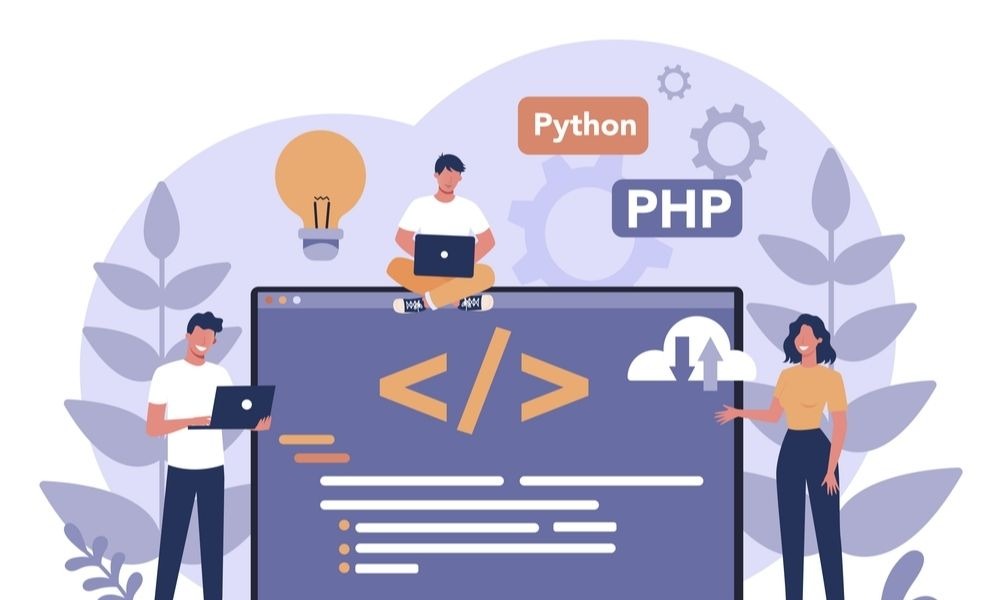
Back-end development stage takes 6 – 8 weeks

Part of the process of developing an app is coming up with the perfect idea. This can be anything from building a game to creating a business app. But before you start, you need to decide what stage your project will be in. The back-end development stage takes about 6 – 8 weeks, so this is the first step in the process. The back-end development stage usually involves building a website and backend programming for apps that are more interactive and have more features.

The next step is front-end development, where you focus on creating an interface and user experience for your app. This step also takes about 6 – 8 weeks, but it’s more focused on design instead of coding. At this stage, you create any graphics or animations necessary for your app such as logos or icons that are used throughout your interface.

The final step is testing and debugging which can take anywhere from 1 week to 2 months depending on how complex the bug or issue is.

7. Front-end development stage takes 6 – 8 weeks

This phase takes between six and eight weeks to complete. A lot of design work goes into this phase, which could be the reason it takes so long.

The front-end development is the most important phase of an app’s development because it creates the visual interface that your users interact with on a daily basis. The developers will be using HTML, CSS, and JavaScript to create these pages. They’ll also have to use their creativity to come up with new features and designs for what they’re building.

This stage also requires good communication skills because the developers are constantly working together to make sure each page is visually appealing and functional for the users’ needs. In addition, there will be a lot of user testing during this time so that the team can make changes and improve the app as needed.

Once these changes are made, there will be a review process where you’ll have an opportunity to test out those changes before they get pushed live on the app store. At this point in time, if any major issues arise from testing, then more development will take place before going live again on an app store.

8. Testing stage takes 2 weeks

The testing stage often takes around 2 weeks. During this period, you’ll be able to test your app on an iPhone (if it’s an iOS app) and see if it works as intended. If you have a software developer or designer involved, they will help make some changes before launching the app so that it will meet your specifications.

Once everything is ready, you can submit your app for review on the App Store. They will then take a look at what you’ve created and put it through their rigorous screening process before accepting it into their store.

9. Finalization and Launch takes 1 week

The finalization and launch stage takes one week. This is the process of completing the app’s design and ensuring that it has proper functionality before it’s released to the public. This is also a good time to get feedback from beta testers about how to improve the app.

This stage will require some technical know-how, but there are many free resources on how to do this–such as tutorials or YouTube videos. Once you finish with this first stage, you’ll have a functioning app that’s ready for release!

10. Post-Launch Support and Maintenance Stage takes 2 weeks

This stage can take up to 2 weeks, but it will be necessary for you to develop a sense of what your app is like after it has been released. This needs to be done so that you can fix any bugs and glitches in your app or update features that don’t work properly after the launch of your app. The post-launch support and maintenance stage is also important so that you can come up with a marketing strategy for your app, which will help improve its success rate.

The 7 stages of app development process
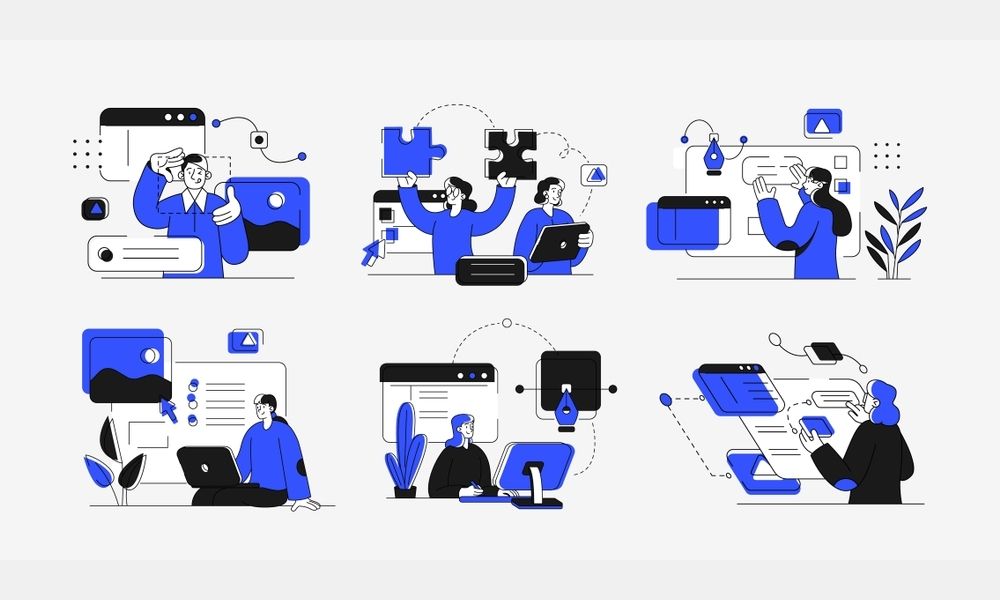
The 7 stages of app development process
The 7 stages of the app development process

App development can take many different forms, but it’s most commonly broken down into seven stages. These stages are usually not experienced in order. There are some apps that require more time to develop, so they start with coding or design, for example. The three most common stages of app development are design, coding, and testing.

1. Business analysis stage

This stage is all about understanding your business and its goals, and then figuring out how technology can help you reach those goals. It’s the first step in the app development process. The goal is to figure out what you want your app to do and how it fits in with your company’s bigger picture before you start coding anything.

2. UX design stage

UX design is one of the first things you’ll need to do when developing an app. UX stands for “user experience” and it’s how your app will look to the user. It’s an important stage because it will set the tone for your app and dictate how people use it. You’ll need to research what users might want in order to be successful, then design the layout of your pages based on those needs.

You should also take care not to introduce any unnecessary content, too many options, or confusing jargon that could frustrate the user. Finally, at this stage you’ll work with a team of designers who can create wireframes, mockups, and style tiles—all which help you visualize what your app will look like upfront—and provide feedback on any changes you want to make before proceeding to the coding stage. For more detailed information about what is exact UX design process, click here

3. UI design stage

This stage typically takes around 2 to 3 weeks, and it is necessary for the app developer to capture the user’s needs and preferences. The UI designer creates a mock-up for an app screen so that they can test it with the user. This allows them to keep working on different screens until they find one that meets the user’s expectations. 

This is where you get ideas for what the app will look like and how it will function. In this stage, you start to put together the basic information about your app, create wireframes that show how the design will work, and determine what resources are needed to create your app.

4. Back-end development stage

This is the development of an app’s functionalities. This is where coding languages like HTML, CSS, and JavaScript are used to create the app’s functionality. It covers everything from creating login sections to enabling in-app purchases. This stage typically takes one to four months depending on the complexity of the app and how much work goes into developing it.

5. Front-end development stage

The front-end development stage is the final stage of app design. It involves actually creating the app and its wireframes. This includes thinking about layout, colors, fonts, and user experience.

6. Testing and launching stage
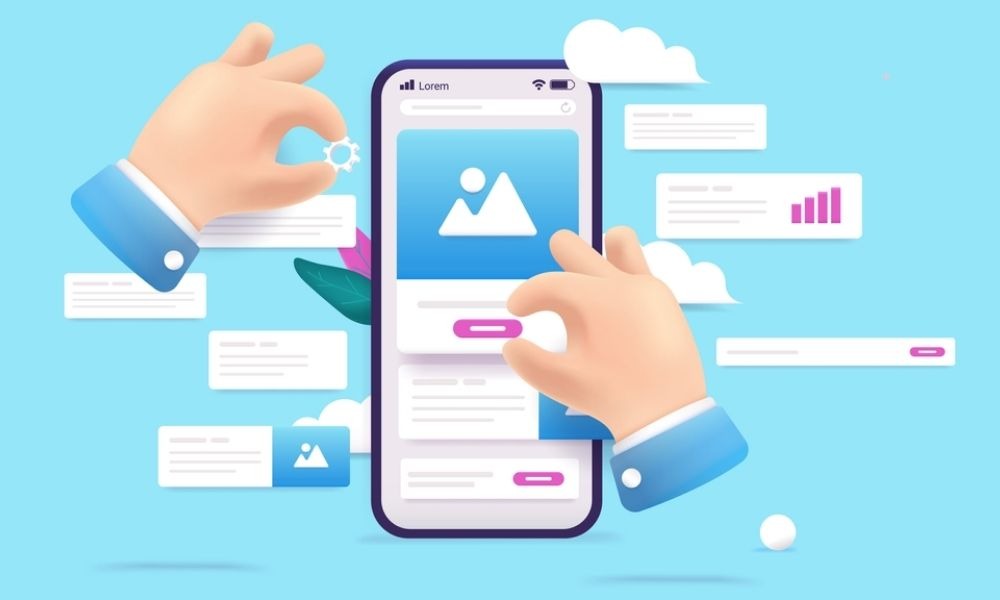
Testing and launching stage

The testing and launching stage is arguably the most crucial stage of app development. This is when your app goes through rigorous testing in order to avoid any last-minute bugs or errors that could have been avoided if they were spotted during development.

During this stage, you’ll need to hire experts in app design, programming, and analytics to test your app for bugs and errors. Design experts will be needed to make sure your app is intuitive for users and easy to navigate. Programmers will be needed to make sure everything runs smoothly on the backend. And experts in analytics will be needed to monitor how well your product is performing after launch, optimizing it accordingly if necessary. 

And if you’re struggling to find an expert for your app development project, Designveloper is one of the best choices at the moment. This incredible team offer all of the services needed for any size business and more – from web development, mobile application design and consulting. Don’t hesitate to contact the team for more information.

7. Post-launch support and maintenance stage

This stage is an often overlooked and forgotten phase of app development that is very important. Post-launch support and maintenance ensures that the app remains up to date, secure, and running smoothly after it has been released to users.

It can be difficult to find bugs and errors in your code after the release because you are so used to seeing the code. You may not know how to fix them or even where they are. That’s why post-launch support and maintenance is so important: It ensures the app continues running without issues for as long as possible.

Conclusion

It seems like every day there’s a new app that takes over our phones and computers. The growth in the number of apps is staggering and it’s no wonder that so many people want to get in on the action. But just how long does it take to make an app? What’s about the app development timeline?

This article already shows you how long it takes to make your app, from start to finish. 

With this information at your fingertips, you can make a smart decision about whether or not you have what it takes to bring your idea to life.

The post App Development Timeline: How Long Does It Take to Make My App? appeared first on Designveloper.


January 06, 2022 at 12:21PM
Share:

Top 5 Best Android App Development Languages for 2022

Android app development is a cornerstone of the mobile industry. It has grown tremendously since its inception in 2008 and now makes up 97% of the smartphone market share. If you want to tap into the fast-growing and lucrative app development industry, it’s essential to learn how to program in one or more of the top 5 Android app development languages: Kotlin, Java, C++, C#, Dark

Within this article, we will go over each language. Why it should be your choice for Android app development languages and what tools are available to get you started.

The first programming language we’ll discuss is Kotlin. It’s a statically typed programming language that runs on the Java Virtual Machine (JVM). Kotlin offers a concise code syntax which makes it one of the most popular choices for Android app developers. Java is one of the oldest programming languages in existence. It’s still used today not only because of its extensive libraries but also because it can be cross-compiled. And many more,…

1. Kotlin

Kotlin-Android-app-development-language
#1 Android app development language in the world

One of the most popular programming languages for Android app development is Kotlin – a statically typed programming language that was created by JetBrains.

It has a concise code syntax that makes it one of the most popular choices for Android app developers. It can be compiled to JavaScript or native code and runs on the Java Virtual Machine (JVM).

The main benefits of using Kotlin for your next project are:

  • Easier to read code
  • Less verbose
  • Concise set of libraries
  • Easy refactoring
  • Faster compilation time

Pros

The benefits of choosing Kotlin over other languages are many. It’s a modern language without too much-outdated baggage, which means there are fewer quirks and less confusing features. It’s a compiled language, you’ll have an easier time scaling your app to multiple platforms or devices, even to mobile apps written in Java.

It also has some cool features like null safety and lambdas. Null safety prevents your app from crashing or throwing errors when it encounters null pointer exceptions. Lambdas make coding more efficient by allowing you to write methods with only one line of code. That can be executed at any part of your app without changing the logic flow.

Cons 

Kotlin is a great programming language to use for Android app development because it’s more concise and type-safe than Java. But, there are some downsides to using Kotlin as your primary programming language.

For one, Kotlin can be difficult to debug and has had compatibility issues with older versions of Android and the tools used for developing Android apps. Some even say there’s a lack of documentation about how some features work.

Another downside is that Kotlin is new and it may only be supported on new devices for a limited time period. It’s also still an evolving language that needs more time to mature which means you’ll need to keep up with the changes as they happen.

2. Java

Java-programming-language
Most popular Android app development language

Java is a general-purpose programming language that was designed to have as few implementation dependencies as possible. This makes it usable across many different platforms. For example, it can be run on any operating system that has a compatible virtual machine installed.

Java is the most popular Android app development language because of its simplicity and availability of resources. It’s easy to get started with Java because it’s one of the most widely used programming languages in existence. Java is also compatible with many different platforms which means you can use whichever operating system you are most comfortable with while still being able to use Java.

Pros 

Java is a great choice for developers who want to work with Android app development. Along with Kotlin, Java provides the best compatibility for apps on Android devices. If you’re going to be releasing your app on the Play Store, you’ll need to make sure that it’s compatible.

Along with being cross-compiled, Java is also one of the easiest languages to learn and use. This is an important factor for those who are new to programming.

Another benefit of Java is its extensive code libraries which provide plenty of resources for developers when they get stuck or want to make improvements. With these libraries, it’s easy to find any project-specific information you need without having to spend time searching through forums or social media groups.

Cons

Despite being one of the most popular programming languages in the world, it still has its cons. One issue is that Java can be difficult to master and requires years of experience to be truly effective. It also offers an extensive amount of libraries which can make it difficult to learn how to program for Android app development without needing to study extensively.

3. C++

C++-Anroid-app-development-language
C++ is a cross-platform programming language

This programming language is considered to be one of the best for Android app development because it offers an easy-to-use syntax and is extremely fast. C++ is also used in other industries like game development, machine learning and desktop applications.

Furthermore, Swift was designed by Apple as a successor to Objective-C, which was heavily influenced by C++. This language can be used for both Android and iOS app development and has many features that make it perfect for creating intuitive interfaces.

Tools are available online or through your Android phone that can help you install these languages on your device to get started today!

Pros

C++ is a programming language that has been around since 1979 and still remains popular because it can be compiled for a number of different platforms.

It’s also one of the fastest languages for Android app development because it uses less RAM. Additionally, it’s one of the most widely used languages for mobile app development.

Java is a general-purpose computer programming language which was first released in 1995 by Sun Microsystems. It’s an object-oriented language with strong support from various libraries which make it easier to develop apps.

Swift is a compiled programming language that was introduced by Apple in 2014 as their new open source programming language. Swift is designed to work with Cocoa and Cocoa Touch frameworks and offers seamless integration with Xcode which makes coding easier and more intuitive. Objective-C is a general-purpose object oriented programming language that was created in the 1980s by Brad Cox and Tom Love for use on Smalltalk-80 systems.


Cons

C++ is one of the most difficult programming languages to learn. It’s also an old programming language with many versions, each with different syntaxes. This can be a major setback for Android app developers who are just starting out. Regardless, C++ is still used in the industry by established professionals.

4. C# 

C#
C# is the evolution of C and C++

Developed by Microsoft as an evolution of the C and C++ languages. It was designed to be a powerful, modern programming language for use in the development of desktop, mobile, and web applications. These days, C# is one of the most popular choices for Android app developers thanks to its simplicity and power.

C# was developed to allow developers to write their programs in a simple and precise manner that can be easily read and understood by other programmers. With this simplified syntax, it’s easy for anyone to start writing code without having significant knowledge about different codes.

Another major reason why C # is popular among app developers is that Microsoft provides tools for all stages of the development process. This includes IDEs like Visual Studio Community Edition which provides you with all the features you need to develop your app from start to finish without any additional purchases or downloads required. 

Pros

C# is a strong, object-oriented programming language that was developed by Microsoft. It operates on the Common Language Runtime which means it can be used on multiple platforms. C# is one of the most popular choices for Android app developers because of its versatility and ability to be cross-compiled to run on any platform.

C# is an object-oriented programming language which means it’s more focused on classes and objects rather than functions or procedures. One of the benefits of this is that there are no undefined values, which makes it easier for programmers to debug their code by providing them with more information about where they need to look for errors.

Cons 

C# has been the go-to programming language for various software projects since it was first introduced in 2000. It is also one of the most widely used programming languages with around 12 million developers in the world.

However, it’s not without its faults. C# is a statically typed programming language which means that variables, methods, and other components are fixed when they’re created. This can be helpful in some ways because you know exactly what you’re getting when you create something but can also mean that your code may not be as flexible. A programmer may have to write more lines of code to get the same result which could be taxing on their time and lead to errors in coding due to fatigue.

5. Dark (newest Android app development language)

Dark-programming-language
The newest and most potential Android app development language

“Dark is a programming language for the Java Virtual Machine (JVM). It was originally developed at Facebook as an experimental tool for doing research on software performance. It was designed to be used together with the open-source Datalog data analysis language, but Dark is not limited to this use case.” What is Dark and why does it matter? Read more here

Pros

Developing in the Dark programming language (DARK) is ideal for quick prototyping and creating games. It’s easy to use, offers a fast learning curve, and is designed for rapid development.

The best part of DARK is that it enables developers to work with multiple technologies like HTML5, JavaScript, and C++. This makes it possible to build anything from simple apps to sophisticated games.

Cons

While Dark is one of the newest languages for Android app development, it has a lot of potentials. It’s based on Kotlin, which is one of the most popular choices for Android app developers.

The cons to using Dark are that it’s only available on Android Studio 3.0 and higher. This means that if you’re not using this particular version or higher, then Dark will be unavailable to you.

Additionally, while there are many positives to using Dark, it lacks some of the features that other languages offer. For example, it doesn’t have any libraries yet so if you need any kind of library for graphics or networking then dark may not be available to you at this time.

However, these are just small negatives in comparison to the pros of Dark programming language.

Conclusion

There are many different languages in the world and many Android app development languages. But which ones should you learn? In this article, we have compiled a list of the best languages for app development for 2022.

As a developing language, Kotlin is quickly gaining recognition because it compiles to Java bytecode and allows Java code to be mixed with Kotlin code. Kotlin also has a number of features that make it more attractive to developers than Java. Kotlin is fast enough for mobile devices and produces smaller executables by eliminating unnecessary runtime checks.

Designveloper is excited to help you jump on board with the latest technology, so call us today! We provide all of the services needed for any size business and more. Our web development service includes web design, mobile application design and consulting and more,… Please give our team a call if you want an estimate or just some advice on how we can help your company in this new field!

The post Top 5 Best Android App Development Languages for 2022 appeared first on Designveloper.


December 30, 2021 at 10:46AM
Share:

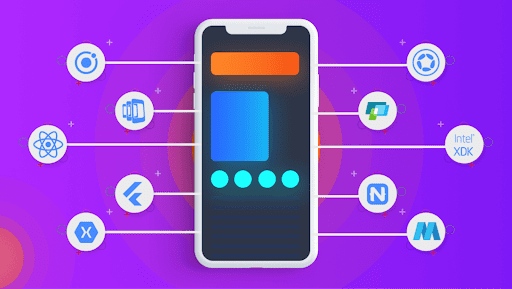
The Top 5 Mobile App Development Frameworks To Consider

Frameworks are an integral part of the modern-day app development process. But choosing the wrong framework for your app project may result in financial and product failures. If you’re new in this world and hesitate about which mobile app development frameworks to consider, this article is the right place for you. 

What are Mobile App Development Frameworks?

A mobile app development framework is a software platform that already integrates essential tools (e.g. compilers, APIs or code libraries) to render your development job faster and easier. 

What-are-Mobile-App-Development-Frameworks?
Mobile App Development Frameworks

In other words, instead of wasting time creating a mobile app from scratch, developers have a framework to handle low-level or basic tasks and provide reusable codes that are easily find in different mobile apps. Meanwhile, programmers only need to focus on advanced functionality, hence reducing the total development time.

Mobile app development frameworks now are divide into three main groups:

  • Native frameworks provide tools to separately develop either iOS or Android apps;
  • Web app frameworks are design to build progressive web apps (PWAs);
  • Cross-platform frameworks allow cross-platform designs that work on different platforms and operating systems.

The Importance of Choosing the Right Mobile App Development Framework

There’s no denying that a framework brings developers many advantages to build mobile apps resourcefully. The software can ease the debugging process, eliminate time wasted in writing familiar codes, enhance code efficiency, speed up the overall development procedure but still guarantee product security. 

Choosing-the-Right-Mobile-App-Development-Framework
The Importance of Choosing the Right Mobile App Development Framework

Having said that, the most advanced technologies don’t mean they fit your business standards and end-user demands. Just imagine you are going on a holiday with luggage full of office wear. Such clothing may work but does not give your most desired outcomes. Similarly, incompatible frameworks may turn your work out of control and diminish the deliverable’s performance to achieve your targets.  

There’s also a controversy over whether frameworks truly prove effective in reducing the development time. Provided frameworks are new or rarely used in app development, they may take development staff much more time to get attuned to these technologies. Not to mention that their APIs’ complexity possibly renders the learning curve steeper. That’s why picking up the inappropriate frameworks for the development team’s competence can drive the development time and cost up. 

Top 5 Mobile App Development Frameworks That You Should Consider

The mobile app development segment is now awash with frameworks whose attributes are supportive of effective development projects. If you have no idea of where to start, this part will detail the top 5 popular native and cross-platform frameworks you should ponder.

React Native

React Native is an open-source, cross-platform framework backed by Meta Platforms, Inc. (formerly known as Facebook). This means the technology allows developers to program once for the frontend terminal and use codes across operating systems. 

what-is-react-native-framework?
what is react native framework?

Apart from that key feature, React Native also comes with other outstanding functions, for example:

  • Hot Reload is a special component of React Native. It enables developers to make changes while the app is still running;
  • React Native facilitates the user interface (UI) development of iOS and Android apps by using JavaScript functions which are often call “native modules”. For this reason, the platform gives developers an advantage to build native-like products;
  • The platform supports a variety of third-party libraries to foster the app’s performance and other functionalities. 

However, a developer may encounter some problems when working with React Native, typically including:

  • A tough learning curve;
  • Debugging issues if they aren’t adept at the platform;
  • The unavailability of several custom elements forces developers to build them from scratch but they can end up with different codebases for respective operating systems instead of one. Not to mention that some advanced native features require the involvement of native developers.

Flutter

Created by Google, Flutter has increasingly grown its recognition from the developer community. With only a single codebase, the open-source platform empowers developers to easily build cross-platform products for iOS and Android. 

Flutter-framework

Since its introduction in 2015, Flutter has improved the app development experience of programmers with exceptional attributes as follows:

  • Dart language provides more advanced components to flexibly customize UI designs for any screen, facilitate debugging and enhance the app’s performance with ahead-of-time (AOT) compilation;
  • Dart virtual machine (VM) incorporates the Hot Reload feature to allow the immediate updates of new codes in running apps;
  • Skia, a graphic engine written in C++, helps develop and remove widgets faster to enhance rendering performance;
  • A huge collection of design-driven widgets helps Flutter apps look more attractive but still fully functional.

On the flip side, Flutter apps are criticizing for their large size. Besides, they are programmed in Dart. So developers must spend time learning the less popular language and its functionality. That may increase the overall development time of Flutter app projects.

Xamarin

Another renowned cross-platform framework in this article is Xamarin. After Microsoft’s acquisition, Xamarin has become an open-source tool that enables developers to create native factors and deliver the same scripts between different platforms thanks to the use of the .NET framework and C# programming language. Therefore, Xamarin draws developers’ attention to its code reusability and improved UI development experience.

Xamarin-framework

Other worthwhile elements of this platform entail:

  • Making apps fast but still guarantee their high quality and flawless designs;
  • Providing an ecosystem rich in native APIs, graphics, libraries and more to build interactive and near-native apps;
  • Incorporating Microsoft Visual Studio to boost the productivity and management of making apps;
  • Integrating Microsoft Azure, a cloud computing solution, and .NET to ease data storage and better the app’s scalability. 

One major drawback of Xamarin is its apps often demand more space than native ones, like Flutter. Contrary to the belief that Xamarin developers don’t need to know native languages such as Swift/Objective-C (iOS) and Kotlin/Java (Android), the ignorance of such technologies may put the development with Xamarin on hold, especially when developers want their apps to have a truly native appearance. 

Swiftic

Swiftic is the only paid cross-platform framework in this list. This technology is suitable for beginners who are seeking a simple solution to building iOS and Android mobile apps in no time without compromising their quality. 

Swiftic-framework

Swiftic is considered an easy-to-use framework with an abundance of basic features (e.g. loyalty cards, in-app coupons or push notifications) to open mobile stores. Requiring no coding skills, the framework allows app creators to tailor their products with available themes, color schemes, icons and more. 

What’s more, one selling point of the framework is its excellent integration with external social media, advanced analytics and so forth. Beyond that, app builders may add their ready-made HTML code to their potential apps.

However, Swiftic doesn’t provide numerous advanced options such as location-based services or in-app adverts. 

Ionic

Ionic is a free cross-platform framework developed on the basis of cutting-edge web technologies like HTML5, CSS3 or JavaScript. Besides, the framework aims at using modern web components (e.g. Custom Elements or Shadow DOM) to make its web APIs more stable than other hybrid frameworks.  

This trait, together with the capability of working with Apache Cordova, AngularJS, React or VueJS, helps Ionic developers make progressive web and native apps that run seamlessly on iOS and Android platforms from a single codebase. 

A wide selection of such integrated hybrid app frameworks also lets developers approach numerous UI components and functions to create impressive user interfaces. Compared with other cross-platform frameworks, Ionic has a shallow learning curve and strong community support. 

Besides the mentioned prominent factors, Ionic shows some cons, typically like its apps’ poorer performance than native counterparts or sluggish operations on graphics-heavy software. 

Which are the Best Mobile App Development Frameworks So Far?

The 2021 Statistics research deduced that Flutter is the most widely used framework by mobile app developers over the last three years. This is followed by React Native, Cordova, Ionic, Xamarin and other important frameworks. 

The 2021 Survey by Stack Overflow also observed that together with coding, scripting and markup languages and other tools, these frameworks prove among the most preferred technologies by global developers. 

Reasons behind this can be plentiful. And one of them is the development staff’s familiarity with such frameworks. Learning new ones can prove time-wasting and even cost consuming, especially when you want to shorten the time between the product development and its launch as much as possible. 

Besides, old frameworks have bigger support communities. This will provide developers with greater convenience and improved functionality, thus saving much time and cost in mobile app creation. 

That’s why such existing frameworks as Flutter or React Native will continue being universally applied in mobile applications in the future, despite the growing interest in new frameworks (e.g. Svelte).

Conclusion

Along with programming languages and libraries, frameworks also play a key role during the development process. Mastering mobile app development frameworks that suit your firm’s ultimate goals is more important than following the most popular ones that prove incompatible with your app projects. So learning about your business requirements and the development team’s capacity is a must to pick up the right frameworks.

The post The Top 5 Mobile App Development Frameworks To Consider appeared first on Designveloper.


December 29, 2021 at 05:44PM
Share:

How Much Does It Cost To Make An App? The Truth Behind the Numbers

App development costs are always among the top concerns of app builders, whether they make an app in-house or outsource it. How much does it cost to make an app? Is the figure fixed or variable on different projects? In this blog post, we’ll help you envisage how app development costs are often calculated and how to optimize spendings on app building. 

What Are The Factors That Go Into App Cost?

Factors-go-into-app-cost
Which factor should you consider when making an app?

An app cost is influenced by assorted cost-driving criteria. First of all, an app itself constitutes multiple software and hardware features, thus little wonder that its expense will be under profound impacts of designing and developing these functions:

  • Type of app (e.g. eCommerce, social networking or video streaming);
  • Visual design and objects such as 2D or 3D graphics, animation or wireframe;
  • App functionality like user profile, push notifications, social media sharing, third-party integration or data security;
  • Supported platforms (i.e. iOS or Android), devices and other hardware components (e.g. the phone’s camera).

However

The real app development process isn’t only limited to such components. The total cost accordingly extends to other crucial factors including:

  • Problem detection and solution;
  • Maintenance and upgrades;
  • Industry maturity and business scale;
  • Those involved in the development team – normally a business analyst, a project manager, UX/UI designers, programmers and test engineers;
  • Internal or external hiring and hourly rates by region;
  • Marketing and advertising after the product launch;
  • License for software used to build an app;
  • App store fees.

Each deliverable consists of unique attributes, hence accompanying different costs. To answer the question of how much your company must pay for an app, you need to determine which properties your app includes.  

An Overview of the Average Cost of an App

Before calculating the average cost of creating an app, you should determine whether the app development project will be allocated to in-house employees or an outsourcing development company. Inevitably, provided the internal workforce has sufficient experience to handle a whole project, you will save more money from full outsourcing. 

In case you outsource the app project, the average cost can be estimated based on which pricing model you prefer and how much of the development procedure your team can tackle. There are some common options in the outsourcing market as follows:

  • Fixed price: Before the project is underway, app development costs will be determined. This pricing structure is accordingly suitable for small-scale projects within a specific development time. The total cost is often based on your company’s requirements and estimated timeline. 
  • Time & material: Following this model, your business has to make a payment based on hourly rates. Therefore, it’s better matched with complicated projects whose criteria are hard to identify at the beginning and possibly modified during the process. Total hours of each development stage will be estimated and then multiplied with an hourly charge. 

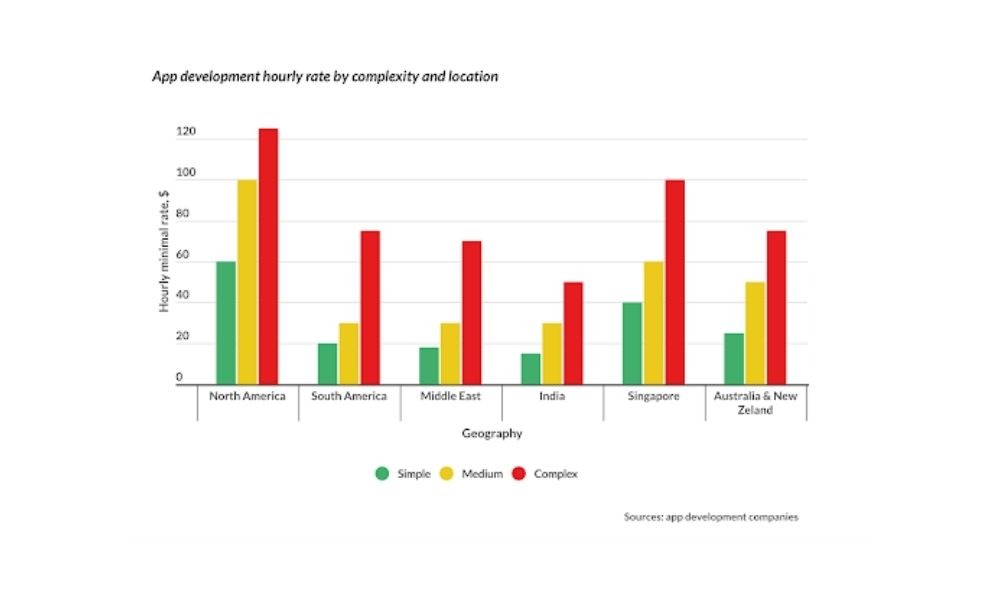
Even when your company augments some external employees or freelancers to handle some parts of a project, the same payment method is also applied. Besides, the cost of hiring a developer will vary across countries as illustrated below.

app-development-rate
App development rate

Moreover, marketing costs and other expenses incurred out of a negotiated contract should be counted in the total app cost. 

How Much Does It Cost to Make an App?

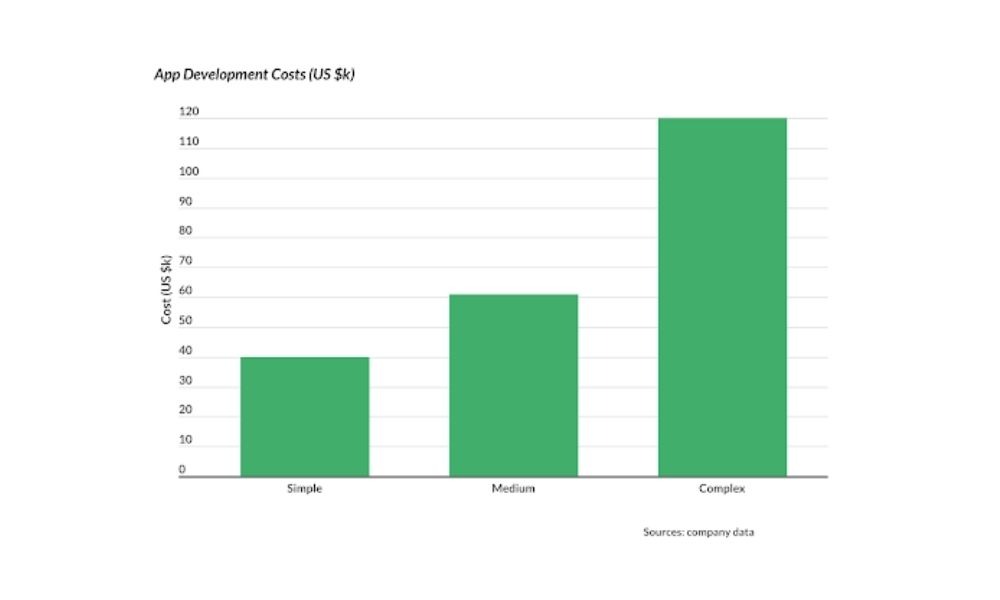
Business of Apps, the leading news and analysis website for the app industry, collected data from numerous companies about how much is spent on their customer projects. The estimated range of spending on app development below are based on the complexity of projects:

  • Simple app development project: US$40,000 to 60,000;
  • Averagely complex app development project: US$61,000 – 120,000;
  • Highly complex app development project: US$120,000 at a minimum.
app-development-cost-in-UK
app development cost in UK

These findings, however, are not the same in many other companies. According to the 2015 Clutch survey, the total app development cost for complex functionality might reach US$727,500 provided the average hourly rate was $150. Meanwhile, other firms report that a large project with complex app development, design and support for at least two platforms may be at least US$300,000. 

Inevitably, it’s hard to conclude an exact figure because how much your app project truly costs depends on the mentioned criteria. The given figures are just approximate for your company to have an objective view of app development costs in the market now. 

The Truth Behind the Numbers 

To clarify how the given figures are gauged, we need to break down the big question “How much does it cost to make an app?” into smaller questions. Particularly, the app development process includes various important phases (i.e. Planning, Design, Development, Testing & Launching, and Maintenance & Upgrade); understanding how different components in each stage are charged will help you have a ballpark calculation of your potential app cost. 

Planning Stage

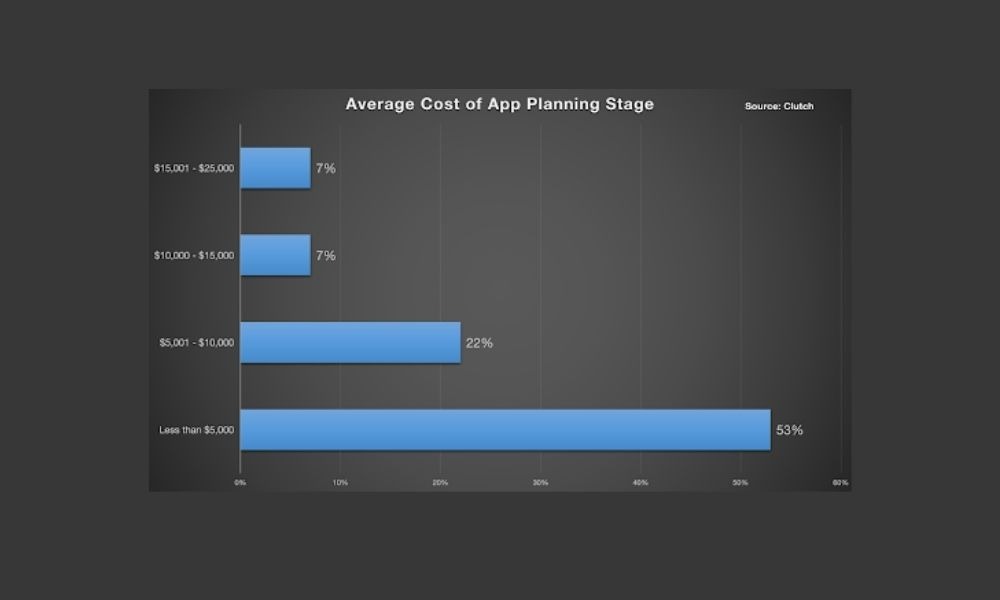
In this phase, both your company and an app developer will define project complexity, scope and other unknown criteria such as client-owned APIs. Even when you have no experience with app development, it’ll take more time to do market research on your own or with the support of the vendor. This helps your company determine whether an app can be a good vehicle to reach your goals. Apparently, those factors act as major determinants of the app planning cost. 

According to the 2017 Clutch survey, the average cost of this phase was no more than US$25,000. Of which, over a half of surveyed companies said that they spent less than US$5,000 on discovery and research components. 

app-development-cost-in-planning stage
app cost in planning stage

Design Stage

This app development phase involves designing an app’s visual architecture. This can be done through the following major tasks:

  • Identifying your app’s platform based on whether you prefer a native or hybrid app. The former is separately designed for either iOS or Android, while the latter incorporates components working well on both operating systems;
  • Focuse on UX/UI design that both meets user demands and complies with App Store or Google Play’s guidelines;
  • Determining a number of pages and screens where your app will be displayed;
  • Building the app’s wireframe that draws up the app layout.

This phase proves important because it’ll decide how attractive your app design may increase end-user retention and usage rates. The design cost depends on the project’s complexity and your design’s flexibility as well as aesthetic. 

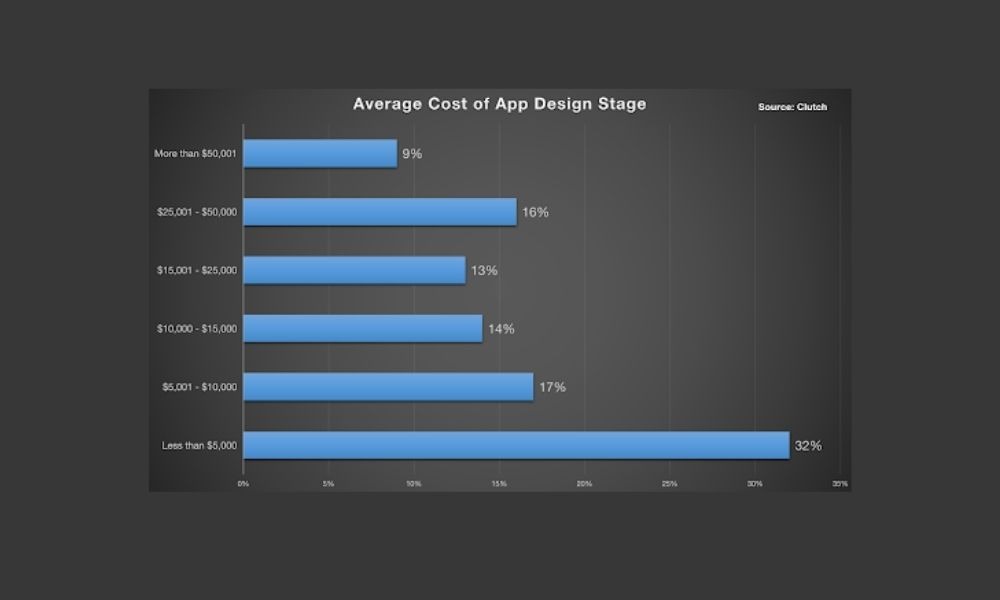
Below is an average range of the app design cost accumulated by Clutch:

how-much-does-it-cost-to-make-an-app
average cost of app design stage

Development Stage

Major drivers behind the app development cost are often a number of developers involved in coding tasks and functionality in terms of its complexity, type and quantity. Apart from fundamental features such as user login or user engagement, advanced functionality as follows also contribute to pushing the development cost up:

  • Payment systems;
  • App management such as performance monitoring and data analytics; 
  • Infrastructure components including data storage, data encryption, third-party API integration, cross-platform sync, scalability and more;
  • AI or ML technologies.

The more advanced components are integrated into your app, the longer this stage lasts and the higher the development cost is charged. 

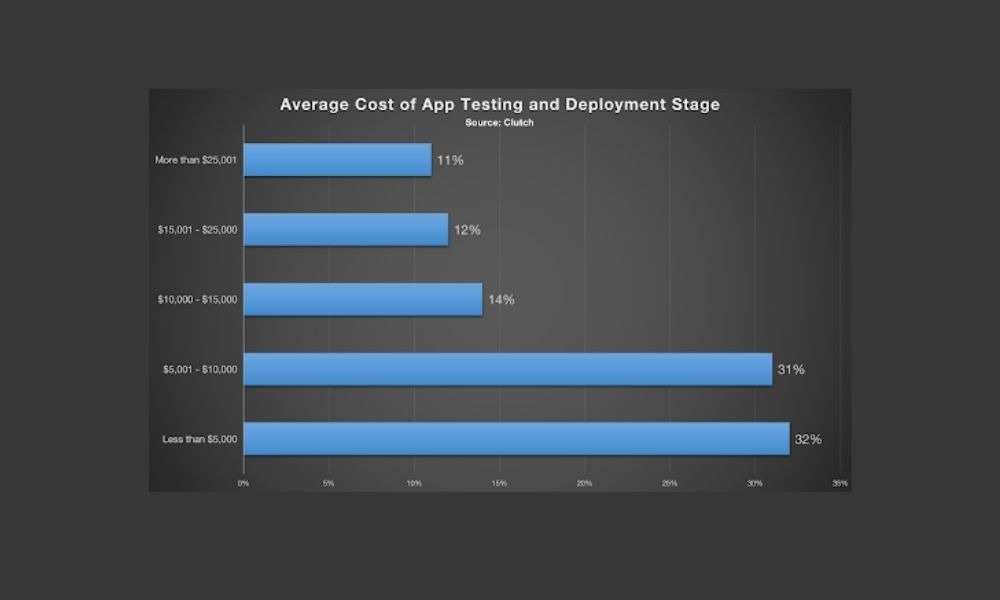
Testing and Deployment Stage

After the development phase, quality analyses will be manually or automatically conducted to detect and correct faults. The duration of testing mostly hinges on the app complexity and a large amount of functionality. Accordingly, highly secured apps or interactive games require more time, hence accompanying higher costs. 

average-cost-of-app-deployment-stage
average cost of app deployment stage

Once testing has been completed, an app will be ready for uploading to the App Store or Google Play. Normally, those stores also offer a licensing service to help you limit unauthorized or inappropriate access to your app. This will undoubtedly come with additional fees.

You should distinguish this licensing cost with the one you must pay for technologies or tools used during the design and development process. 

Marketing and Maintenance Stage

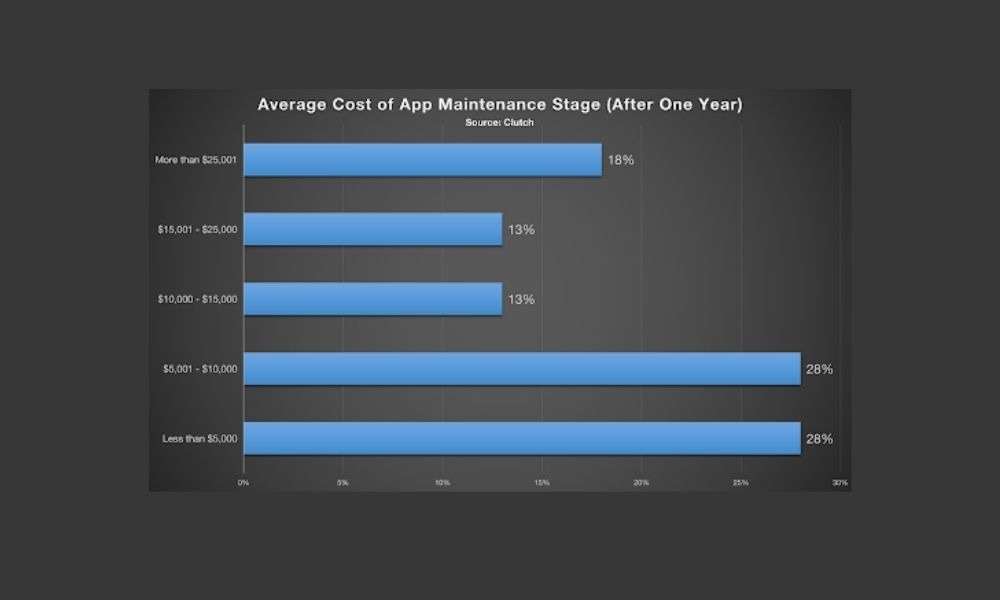
No app is perfect with its first version, regardless of a huge investment in the initial project. Therefore, frequent updates and maintenance are essential to keep users engaged in the app and attract new customers. The maintenance cost may relate to hosting servers and even analytic tools. 

average-cost-of-app-maintenance-stage
average cost of app maintenance stage

Marketing is needed as well to make your app renowned by the public. Cost Per Install (CPI) is among the most populous means to advertise the app. Accordingly, developers will put an advert on different media channels at certain prices to drive new installation. For example, placing an ad on iOS games costs US$4.3 per install whereas this figure is only US$1.15 on Android games. 

Tips That Will Save You Money on Your App

tips-on-save-app-development-cost
tips on save app development cost

Optimizing costs on an app yet guaranteeing its efficient performance and appeal to end-users are always the ultimate goal of any company. Here are some common tips to help your company save money in app development:

Determine how much of the development process to conduct internally:

Instead of full outsourcing, many business owners let their internal team handle several pieces they excel at, for example, planning and design, to keep the costs down. 

Choose a dedicated developer:

Whether your app involves a short-term or long-term development process, you always need a dedicated team that is willing to support the deliverable even after its launch. Lack of assistance from the developer will come with additional costs, especially when your app has problems like running sluggishly. 

Grasp your business needs:

No app developer may read your mind, hence struggle to build proper solutions unless you give a vendor detailed requirements and specs about a potential app. To do so, you should understand your company’s existing problems, end-user demands, and even competitors’ digitalization strategies. 

Keep your app simple:

It’s more advisable to focus on several core functions that bring your users the most value and make your brand stand out.

Consider the responsive design and cross-platform functionality

Responsive design facilitates smooth app performance across devices of all sizes. Meanwhile, cross-platform apps can be compatible with both iOS and Android. So these solutions prove more economical than developing apps separately for each operating system.

Communicate with the team:

Frequent interactions between your company and the outsourcing team are necessary to avoid misunderstandings that delay the whole work and incur extra costs. 

Test your deliverable thoroughly:

End-user dissatisfaction with faulty products may directly affect your company’s revenues and even reputation. Also, debugging afterward costs you more. Therefore, testing should be done carefully before the product launch. 

Conclusion  

How much does it cost to make an app? The answer relies much on a wide range of components that arise in different app development phases. The mentioned figures in this article are only for reference. So you should work closely with an IT service provider to produce a more precise estimate.

With this latest technology now available, it is a much better option for you to switch to Designveloper. We offer all of the services needed for any size business and more – from web development, mobile application design, and consulting. We are here waiting for your call! Give us a call today if you want an estimate or just some advice on how we can help your company with these new developments in technology!

The post How Much Does It Cost To Make An App? The Truth Behind the Numbers appeared first on Designveloper.


December 29, 2021 at 05:17PM
Share:

What Is Mobile App Development: Everything You Need to Know

Mobile-driven activities have gained growing popularity among individual and organizational users. This tendency is developing at a greater rate in upcoming years as an inevitable result of increased business mobility. This undoubtedly arouses the long for customized mobile apps, whether they serve any purposes. 

So what is mobile app development? The article will revolve around this main topic and give you a deep insight into this tech subsegment. 

What is Mobile App Development?

As the name exactly suggests, mobile app development includes all practices and processes of designing and building an application that runs on different operating systems (e.g. iOS or Android) in mobile gadgets. 

This job, however, covers much more essential activities than it. Whether your company uses in-house staffing or external teams to make a mobile app. The main responsibilities often range from identifying existing problems, coming up with feasible ideas to even marketing and upgrading a deliverable after launch. 

As a sub-sector of software development, building a mobile app also ponders such important features as hardware specs, screen sizes, or configurations. To guarantee its compatibility with assorted devices. Also, core and advanced functionality can vary as per your company’s industry (e.g. healthcare, hospitality or banking). Types of apps (i.e. hybrid, native or progressive web) and usage purposes. 

what-is-about-mobile-app-development
What is about mobile app development that you should know

What are the Different Types of Technologies in Mobile App Development?

Once answering the question “what is mobile app development?”, your company will determine special tools used in each stage of the development process. Accordingly, we’ll divide these technologies into five major categories as follows:

Front-end Development Tools

Elements displayed in the user interface are outcomes of front-end development. To build an attractive outlook for your app. And to increase user experience (UX), both front-end developers and UX/UI designers need such notable programming languages, frameworks and libraries as JavaScript, HTML5, CSS3, Objective-C or Swift. These technologies and tools can vary across project requirements, operating systems and app types. 

Additionally, the availability of app builders now contributes to ease front-end developers’ work by accompanying already built features and drag-and-drop systems. Some typical development platforms entail Appery, Zoho Creator and Appy Pie. 

Back-end Development Tools

Any requests or data provide by clients on the front-end side will be processed. In the server where customers cannot directly see. Building a long array of reusable features which are centrally monitor behind the screen. Among the main responsibilities of back-end developers. 

back-end-development-tools
Don’t forget to research back-end development tools

Given back-end technologies, you may think of:

  • Coding languages: Kotlin, Swift, Python or Ruby; 
  • Frameworks and libraries: Swiftic, React Native, Node.js and more;
  • Cloud platforms: including infrastructure as a service (IaaS) and platform as a service (PaaS) such as Google App Engine or Microsoft’s Azure;
  • Database servers: typically IBM Informix or Microsoft SQL Server which facilitates the computer approach to databases;
  • Mobile application servers: functioning as a bridge between the back-end server and the client terminal.

Moreover, your company can make the backend development easier by using backend services namely Back4App, Firebase, or Parse. These platforms offer pre-built functionality in terms of database, security. 

Testing Tools

To guarantee your mobile app is free from bugs and defects, testing before introducing the app to the public is a must. Mobile app testing can be manually or automatically implemented.
In the market now, there is a myriad of free and paid automation tools to test the app performance, typically TestComplete, Kobiton, Avo Assure, and Katalon Studio. 

Project Management Tools

The mobile app development procedure involves the development team, project manager and your company’s representative. To ensure work wraps up by deadline and eliminate unexpected misunderstandings, project management software is need during the process. Accordingly, staff may easily follow their assigned tasks and completion status whereas your company can give feedback in no time. 

What are the Benefits of Developing Your Own App?

When your target customers shift their activities to a virtual world, tailoring your mobile app proves necessary to promptly satisfy their online demands. In turn, your company itself accordingly receive accompanying benefits as follows:

  • Position your brand better: Like other corporate identity factors (e.g. logo or colour), a mobile app also helps engrave your company’s online presence into customer minds by providing intuitive design.
  • Improve communication with customers: The software improves your company’s relationship with end-users through frequent and speedy interactions which they highly appreciate. Even for out-of-office conversations, the app provides chatbots to automatically answer the common questions of customers. This will become your competitive edge and help accelerate your customers’ trust in the company.
  • Enhance efficiency: The introduction of a mobile app undoubtedly enhances worker productivity and ROI. In particular, the software allows staff to collect feedback from customers for the later product improvements and produce reports in real-time. What’s more, employees may save a plethora of data to the cloud.
the-benefits-of-making-a-mobile-app
There are a lot of benefits when making a mobile app

Apart from saving time, features available on mobile apps will help employees have a detailed view of their work performance and accountability. Accordingly, they may suggest viable solutions to enhance the quality of products or services provided.

  • Secure your sensitive data: Depending on industry standards and business requirements, the mobile app comes with custom security features like multi-factor authentication or fingerprint scanning. Such functionality possibly protects confidential information from cyberattacks.

What Do You Need to Know Before Building an App?

The worldwide mobile app market is projected to grow by $653.91 over the forecast period of 2021-2025. For this reason, this industry can bring numerous promising prospects for companies of all kinds to approach their potential niche without hassle. However, it’s also equally important to know whether your company should engage in this world and what you should be prepared for if you decide to build your app. 

Is a Mobile App Essential to Your Company?

A mobile app may come with various merits, but not all companies need to develop one if they find it unnecessary for their long-term growth. Therefore, before investing money and time in customizing an app, you should ask some crucial questions like which opportunities and challenges the software may give you or what the present-day market tendency is. 

Moreover, it’s advisable to understand user demands and competitors, which partially helps you decide whether the app may become an advantage over rivals to increase customer loyalty and engagement.

Length of Time, Cost and Other Requirements of Building an App

Your company should identify the duration and cost of mobile app development unless you want delays and unexpected costs in launching the app to reduce business performance and competitiveness. Further, other specialized requirements should be added to the idea-building process, suit your business goals and solve your business’s current issues. Given your business capacity, you should also ponder whether developing an app internally or externally is a better option.  

App Feasibility and Usability

No matter which type of mobile app your company aims at, it should be built based on end-user stories. In other words, your potential app should be equipped with intuitive UI design and tailored functionality that delivers business value to customers with ease and emphasizes their demands. 

app-feasibility-and-usability
what is app feasibility and usability

To test the viability of your new idea, you may factor in building a minimum viable app (MVP) first. This software only includes the most important features and helps you learn about your end-user reactions faster. 

Security Solutions

Information security is always one of the important issues your company should precede, especially in vulnerable industries like finance or healthcare. 

Continual User Involvement

Apart from app feasibility and usability, other factors should consider getting existing and potential customers involved in the app with enthusiasm.

No player wants their game to be interrupted by disturbing ads nor do shoppers want retail stores to give them no benefits (e.g. higher discount rates or free shipping) for online shopping. Therefore, thinking of how to make your users love to use the app continuously should be prioritized as well.

Money Earning From an App

Monetizing a mobile app is what many non-commerce companies do to get funds for operating the software. Game apps may charge fees for in-game items while reading apps may incorporate in-app advertisements that show up between chapters. Depending on which app type your company plans to build, money-making methods may vary but should avoid annoying users. 

How Can You Find a Good Developer for Your App?

Besides the in-house workforce, you may allocate much of the development job to several individual freelancers or an outsourcing company. Finding a mobile app developer now isn’t so daunting if you spend time wandering around freelance websites (e.g. Fiver or Toptal) and B2B directories (e.g. Clutch.co or GoodFirms.co) or even making use of your network to seek one. 

How-Can -You-Find-a-Good-Developer-for-Your-App?
A good developer is the one-stop-shop important thing that you need to have

In this section, we’ll list some noticeable tips to help your business find a good developer for your app development project:

  1. Clarify business objectives: 

Your desired app won’t be successfully developed if you have no specific app idea, target niche and business needs. Important questions should be asked so that you may envision your potential product, like “what does your company want to achieve from an app?” or “what are your company’s current problems?” and “how does the app help your business to solve these issues?”

  1. Do thorough research:

An excellent developer isn’t always compatible with your business. Therefore, it’s more advisable to discover a developer’s areas of specialization, development process, project management, average rates and legal contracts. 

  1. Learn about a developer’s experience:

In addition to the given criteria, your company should spend time looking at the developer’s experience. Unbiased reviews and ratings on reliable B2B directories may help you to do so.

  1. Pay attention to communication:

Communication is an important factor throughout the development process. So if a potential developer and your company fail to understand each other at the beginning, nothing ensures the later partnership will go well. Therefore, you should observe how the developer understands your current problem. Or focus on business demands as well as whether the IT vendor uses any tool to boost communication between both parties during the procedure. 

How Does It Work?

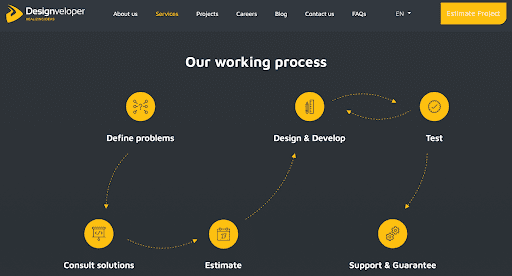
The mobile app development process can slightly vary across developers. But it often covers several main steps already mentioned in the first section “What is mobile app development?”.  Below is a typical example of how a mobile app project at Designveloper from A to Z:

Designvelopers-working-process
Example of Designveloper’s working process
  • Define problems: In the first meeting, albeit online or in-person, with clients, the outsourcing company will assist them to identify and analyze existing issues;
  • Consult solutions: Afterwards, the company will suggest digital solutions that suit clients’ pre-determined business goals and tech specs;
  • Estimate: Once finalizing a solution, those involved will gauge possible costs and time to complete the project;
  • Design and develop: At this stage, the development team will begin creating UX/UI designs and building back-end servers based on the required metrics. Communication between the parties will proceed to see how the work goes and whether any modifications made;
  • Test: App defects and faults discover in this stage will be immediately corrected before the finished deliverable is release;
  • Support and maintain: The IT service provider continues supporting clients through maintenance and upgrade services to make essential changes based on end-user feedback.

Conclusion

Mobile app development has a more prospective future as a result of increased mobility. In the article What is Mobile App Development: Everything You Need to Know, we hope you will better knowledge of this sector to make a sensible decision in building an app.

The post What Is Mobile App Development: Everything You Need to Know appeared first on Designveloper.


December 29, 2021 at 04:28PM
Share:

5 Mobile App Development Companies in India You Should Know

India’s mobile app development industry has seen rapid growth in the last decade. With more than 600 million smartphone users in India, apps have become a necessity for most people. However, it can be difficult to know which company to choose when you need an app for your business or product. Here is a list of the top mobile app development companies in India you might want to know about:

1. Algoworks

2. Hyperlink Infosystem

3. TechAhead

4. Appinventiv

5. Indus Net Technologies

Mobile app development company in India

India’s mobile app market is one of the most saturated in the world. With more than 600 million smartphone users in India, apps have become a necessity for most people.

India has companies that are focused on creating apps across all sectors of the industry, from agriculture to healthcare to education. This diversity makes it easy for businesses looking to create an app to find a company that suits their needs.

Additionally, since there are so many app developers in India, it can be difficult to know which company to choose when you need an app for your business or product. There are some great companies out there, but here are some that stand out:

Algoworks

Algoworks the mobile app development company in India

This is the top mobile app development company in India. They have a team of more than 100 developers with extensive knowledge of the latest technologies. The company helps businesses with their mobile app development needs. Whether you need a custom app, an SDK integration, or a hybrid mobile app, Algoworks can help your business succeed with mobile app development.

They offer services in key areas of enterprise mobile app development, enterprise content management solutions(CMS), customer relationship management (CRM), and software product engineering. Algoworks is one of the top service providers in SaaS technologies like Salesforce that can provide a consultative-driven approach to optimize software processes for businesses. Our experts follow an end-to-end approach when providing mobility solutions too!

Hyperlink Infosystem is one of the top mobile app development companies in India.

This is one of the top mobile app development companies in India. Founded in 2011 by Harnil Oza. The company has developed more than 100 apps for companies of all sizes, across various industries.

Some of the brands that have hired this team to create mobile apps are Papa John’s Pizza delivery app, Vocal coach app, Digital banking solution, Scan To Go – document scanner app, and more…

This is a popular IT service provider in Ahmedabad, India. It offers its clients top-notch results and solutions across various industries. The company structures itself to offer customers a more acquirable experience with its range of practical services.

TechAhead

TechAhead is the most popular mobile app development company in India

They are an expert app development company that has helped many brands to create innovative apps for their target audience. 

TechAhead has created more than 125,000 apps for enterprises and has designed more than 1 million apps. A huge success story for TechAhead is Haulink, a project by BT Trucking, one of the oldest and most influential transportation companies out of Chicago. For decades they have been providing state-of-the-art services to enterprises across America.

TechAhead specializes in :

– Security applications

– Content management

– Location-based services

– Social networking applications

– Ecommerce solutions

– Healthcare software solutions

– Gaming apps

– Utility solutions

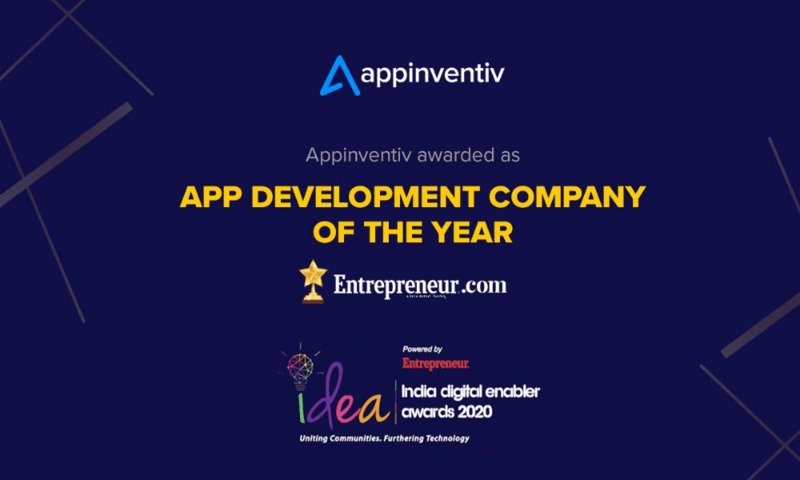
Appinventiv

Appinventiv is a mobile app development company in India that provides custom software development services

They offer a wide range of software products and services to help businesses, entrepreneurs, and organizations take their innovation to the next level. They have been developing apps for over five years and have successfully delivered over 500 highly successful projects.

Indus Net Technologies

Indus Net Technologies is one of the best mobile app development companies in India
Indus Net Technologies is one of the best Mobile app development companies in India
With over 10 years of experience in mobile app development, they specialize in Android and iOS app development. They offer state-of-the-art services for all your business needs.

1. Expertise

2. Quality

3. Engagement

4. Cost

5. Scalability

The disadvantage of working with India’s mobile app development company is the language barrier. A lot of local developers don’t speak English, which can make it difficult to communicate your business’s needs. You may also need to conduct a bit of market research on mobile app development companies in India before making a decision.

If you want a high-quality mobile app that has been developed as per your specifications, you may want to choose one of the top five mobile app development companies in other countries: Vietnam, Taiwan, Japan,…

How to choose the best one for your needs?

If you’re looking for a mobile app development company in India, you need to make sure the company has the skills and knowledge to create an app that will help your business grow. Here are some factors to consider when choosing a company:

  1. Company experience: Make sure to find out how long they’ve been creating apps and how many apps they’ve developed.

2. Services offered: A good company should offer all of the services needed to create an app for your business, including design, development, marketing, and more.

3. Pricing: Prices vary depending on the complexity of your project. Make sure you understand what is included in the price before making a final decision on which company to choose.

4. Prestige: You want your business or product to be associated with quality work that delivers results. Find out more about their customers and see if they have any testimonials on their website or social media page.

Have you ever worked with another global outsourcing company?

Still can’t find any mobile development company in India? Don’t worry we’ve got you covered, here is something about another choice: working with other global companies.

By working with a global outsourcing company, you’re able to capitalize on their expertise and resources. They have years of experience in the field, so they can provide your company with the best possible service. They also have access to a global client base that can help your business grow and expand.

Additionally, outsourced services are often less expensive than domestic ones. With a global outsourcing firm, you can have access to a wide range of skilled professionals from all over the world who can deliver high-quality products and services for your business at an affordable price tag.


Some of the top mobile development companies in Vietnam you might want to look for:

Conclusion

It doesn’t matter what type of app you are looking to develop, every company needs a developer to get the job done. If you are looking for a mobile app development company in India, you have come to the right place. India is one of the most diverse countries in the world with over 1 billion people. Naturally, there are many great developers that call this country home. These developers can help you create any kind of app you want whether it is for personal use or commercial purposes.

You know it’s not easy to make the right decision, but we at Designveloper are here to help. We offer a wide range of services from mobile applications and web development to business consulting. Just tell us now for free estimates! Don’t hesitate to contact us directly if you want your company to need any upgrades with this latest technology that’s available today.

The post 5 Mobile App Development Companies in India You Should Know appeared first on Designveloper.


December 28, 2021 at 05:07PM
Share:

Popular Post

Web Design

5 Quick-fire portfolio tips from design experts

Your design portfolio is one of your most useful tools. It can win you commissions, help you snag a new design job, attract collaborators, a...

Labels

Most view post